Blog
File Descriptors: Part 1
This is an introduction to file descriptors in linux.
Lets talk about file descriptors in this blog post. This is an important topic when talking about linux systems. Literally everything in linux is a file so its important to understand the foundation of a file system which is how files are described.It means many I/O endpoints are exposed as file-like: regular files, pipes, sockets, devices etc.
What are file descriptors ?
They are positive integers starting from 0 all the way to the maximum file descriptor integer. Imagine a process want to open a file, when it calls the open syscall and it assigns an integer in its file descriptor table. It chooses the lowest possible integer available. Once they do this they now have a way of referencing that file in their file descriptor table
How many FDs can I open?
Per-process:
ulimit -nSystem-wide:
/proc/sys/fs/file-max.
Why do we need file descriptors ?
There are multiple ways that a process can interact with a file in linux. Processes can read a file, they can write to a file, they can append to a file. These file descriptors help the system keep track of the files they open close and have access to modify.
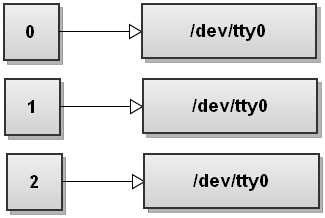
Standard File descriptors (0,1,2)
There are three important file descriptors in a linux file system. 0,1,2 are the FDs for the stdin, stdout and stderr. So basically processes use these numbers to either take input, or write out to the terminal. Sometimes they can point to a file as well, but that means that means there is some shell redirection happening. These three FDs are reserved for output and input
Next part
We will look at how the file descriptor table looks like and how syscalls interact with the file descriptors.